
Best Cloudways promo codes for India in 2026: THATMY30 — 30% off for 3 months (saves ₹941 at the ₹1,045 Bangalore starter); CLOUDS2022 — ₹2,850 (~$30) free credit (never expires, covers ~3 months on DigitalOcean Bangalore); THATMYCLOUD — Cloudways Autonomous discount (managed WordPress with autoscaling and free Cloudflare Enterprise). All codes entered at the Cloudways signup page. The discount appears on your invoice — not at the plan selection screen.
I have been using Cloudways since 2022 and I test every code on this page monthly through a fresh, real Indian signup. Below are the only three that actually work in 2026, plus the November Black Friday deal when that window is live.
Heads up: Cloudways does a $1 (~₹95) refundable authorization hold during signup. It is a fraud check, not a charge — it reverses within minutes. After that, your discount or credit applies automatically on the next invoice.
Since Cloudways uses hourly billing, the "best" code depends entirely on your monthly spend. I have built a decision table below that does the math for common Indian usage patterns.
1. THATMY30 — 30% Off for 3 Months

THATMY30 is our primary exclusive partner code. Enter it at signup and Cloudways knocks 30% off your invoice for 3 months. The discount scales with your bill — at ₹1,045/mo Bangalore starter, you save ₹314/mo (₹941 total). At ₹9,500/mo agency spend you save ₹8550 total over 3 months.
- ✅ Scales with spend — bigger server = bigger saving in rupees.
- ✅ Unlimited free migrations — Cloudways' experts move your existing WordPress/WooCommerce sites at no cost.
- ✅ Works on all 5 cloud providers: DigitalOcean, Vultr, Linode, AWS, and GCE.
- ✅ Covers both Cloudways Flexible and Cloudways Autonomous plans.
- ✅ Discount extends to Cloudflare Enterprise and other add-ons on the same invoice.
- ✅ Works on the DigitalOcean Bangalore server — India's lowest-latency option.

THATMY30 — 30% Off for 3 Months (Best for Most Users)
Saves ₹941 at starter · Scales with your spend · All cloud providers
New accounts only. Discount applied at billing, not plan selection.
2. CLOUDS2022 — ₹2,850 (~$30) Free Credit

If you prefer a flat credit over a percentage, CLOUDS2022 is the alternative path. Cloudways drops ₹2,850 (~$30) into your Funds balance at signup. That balance pays your invoices automatically until it hits zero.
- ✅ ₹2,850 (~$30) flat credit. Covers ~3 months on DigitalOcean Bangalore starter.
- ✅ Never expired since launch — the longest-running Cloudways code on the market.
- ✅ Best when your monthly bill stays below ₹3,230 (~$34).
- ✅ Works on the Bangalore datacenter — same as THATMY30.
CLOUDS2022 — ₹2850 (~$30) Free Hosting Credit
Covers ~3 months on DO Bangalore · Never expires · Best below ₹3230/mo spend
New accounts only. Credit applied to Funds balance.
Note: CLOUDS2022 applies to Cloudways Flexible plans. For Cloudways Autonomous (managed WordPress), use THATMYCLOUD below.
3. THATMYCLOUD — Cloudways Autonomous (Managed WordPress)

THATMYCLOUD is the dedicated discount for Cloudways Autonomous — their fully managed WordPress product. Since the November 2025 repricing, Autonomous is usage-based: you pay a baseline plan plus only the autoscaling and storage you actually use, and visits are now unmetered. It autoscales for traffic spikes, ships with free Cloudflare Enterprise (~₹23,750/year value), and bundles Object Cache Pro. Plans start at the Growth tier, $99/mo (~₹9,405).
- ✅ Autoscaling — stays fast under load during Big Billion Days, sale events, product launches.
- ✅ Unmetered visits (since Nov 2025) — no traffic caps; pay only for the baseline plan plus actual usage.
- ✅ Free Cloudflare Enterprise CDN — ~₹23,750/year in value included.
- ✅ Zero server management — fully managed, no sysadmin knowledge needed.
- ✅ Built for high-traffic WooCommerce stores and EdTech LMS sites in India.
- ✅ Up to 85% higher LMS throughput on Lightning Stack vs the previous Apache stack (Koddr.io benchmark).
THATMYCLOUD — Cloudways Autonomous Exclusive Discount
Managed WP · Unmetered visits · Free Cloudflare Enterprise (~₹23750/yr) · Usage-based from ₹9405/mo
New Cloudways Autonomous accounts only.
Cloudways Flexible vs Autonomous — Which Should You Choose?
Cloudways sells two products. Pick the right one before you choose a code — it decides which deal applies.
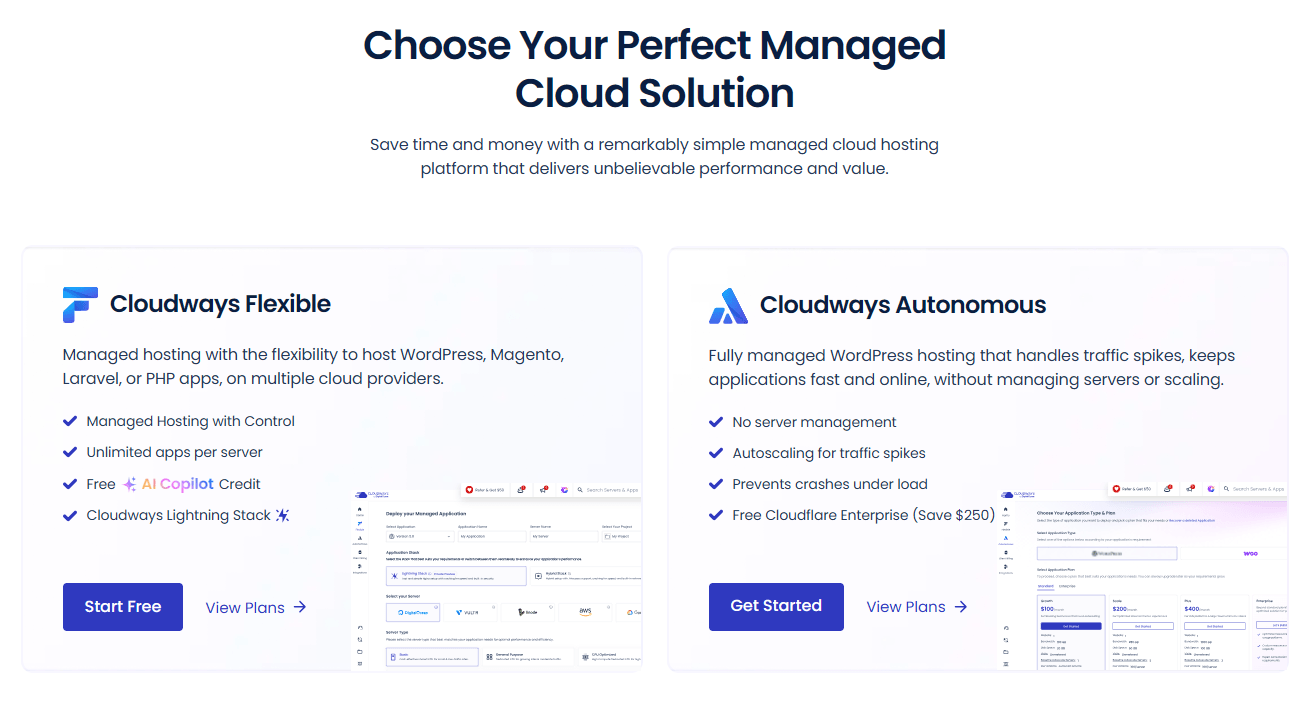
⚡ Cloudways Flexible
Pick your own cloud server (DigitalOcean, Vultr, Linode, AWS, GCE) and stay in control. Fixed monthly price from ₹1,045/mo ($11). Best for most Indian sites, WooCommerce stores, agencies, and budget builds.
Use: THATMY30 (30% off 3mo) or CLOUDS2022 (₹2,850 credit).
🚀 Cloudways Autonomous
Fully managed WordPress that autoscales under traffic spikes — zero server management, unmetered visits, free Cloudflare Enterprise. Usage-based from ₹9,405/mo ($99). Best for high-traffic WordPress/WooCommerce that cannot go down during a sale.
Use: THATMYCLOUD.
4. Black Friday Deal — 50% Off for 4 Months (November Only)
Every November, Cloudways runs the biggest discount of the year — typically 50% off for 4 months. At ₹1,045/mo Bangalore starter, that is ₹2090 in total savings. I signed up during Black Friday 2022 and that deal saved me more than any other code.
- ✅ 50% off for 4 months — beats every other code on this page.
- ✅ Typically includes free migrations (up to 50 sites) during the event window.
- ✅ Only activates during the last week of November — not currently live (returns late November 2026). When the window opens, take it immediately.
Honest advice: If it is November and a BFCM deal is active, stop reading and take it. If it is not November, scroll back up and use THATMY30 or CLOUDS2022.
5. 3-Day Free Trial (No Code Needed)
Every Cloudways account gets a 3-day free trial automatically. No code, no special link, no credit card. 72 hours of full dashboard access — install WordPress, run a TTFB test, and explore the platform.
- ✅ No credit card required. Full server access for 72 hours.
- ✅ Can test the Bangalore datacenter latency for your Indian audience before committing.
- ⚠️ Server is deleted after 3 days. Not enough time for a real migration or traffic test.
- ⚠️ Cannot upgrade server size during the trial period.
What I'd do: Skip the bare 3-day trial. Use THATMY30 or CLOUDS2022 to turn those 3 days into 3+ months of real testing time.
Which Cloudways Promo Code Should You Use?
This depends on one number: your expected monthly spend in rupees. Here is the India-specific cheat sheet:
| If you… | Use Code | Approx Saving (INR) |
|---|---|---|
| Spend under ₹3,230/mo | CLOUDS2022 | ₹2,850 flat credit |
| Spend ₹3,230+ /mo | THATMY30 ★ | 30% × 3 invoices |
| Run managed WordPress | THATMYCLOUD | Autonomous plan discount |
| It is November | Black Friday Code | 50% × 4 months |
- Most users / any spend? → Start with THATMY30 (30% off 3 months, scales with plan size). ★
- Tight budget / starter plan? → Use CLOUDS2022 (₹2,850 flat covers ~3 months on Bangalore).
- WooCommerce / LMS / high-traffic WordPress? → Use THATMYCLOUD on Cloudways Autonomous.
Cloudways Savings Calculator (INR)
Enter your expected monthly Cloudways spend and see which code saves more — instantly, in rupees, at today's rate (₹95/$).
Estimates only. One code per account; codes apply to new accounts at signup.
Best Cloudways Server Location for India
Choosing the right datacenter cuts your TTFB by 40–60% for Indian visitors — it matters more than any caching plugin. Here is what is available:
⭐ DigitalOcean Bangalore
Cost: ₹1,045/mo ($11) for 2GB RAM, 1 vCPU, 50GB NVMe, 2TB bandwidth.
Best for: Sites targeting NCR, Mumbai, Pune, Hyderabad, Bangalore. Closest major DigitalOcean node to most Indian internet users.
Use with: THATMY30 or CLOUDS2022
AWS Mumbai
Cost: Higher than DO (AWS pricing varies by region).
Best for: Enterprise workloads, compliance needs, or sites requiring AWS-specific services like RDS or S3.
Note: Bandwidth costs are significantly higher on AWS vs DigitalOcean.
My recommendation for Indian startups and SMBs: Start with DigitalOcean Bangalore. Cloudways measured Mumbai-hosted WordPress at an LCP of 1.4s without CDN → 1.3s with Cloudflare CDN. Enable the free Cloudflare CDN (edge nodes in Mumbai, Chennai, Delhi, Hyderabad) for pan-India coverage at zero extra cost.
India has the fastest-growing startup base worldwide — 65% concentrated in NCR, Mumbai, and Bangalore. If your visitors are in those cities, the Bangalore server gives you sub-50ms TTFB. That is not achievable from a US or EU datacenter regardless of CDN.
Use THATMY30 with the Bangalore server: Enter the code at signup and select DigitalOcean → Bangalore during server creation. The 30% discount applies regardless of which datacenter you pick. First month on DO Bangalore: ₹1,045 → ₹732 after the 30% discount.
Cloudways Performance in India — Real Benchmark Numbers
Before committing ₹1,045/mo, you want to know what you are actually buying. Here are the benchmark numbers from independent tests — not Cloudways marketing copy.
1. Lightning Stack — Tested by Koddr.io (Independent)
Cloudways' Lightning Stack (NGINX + PHP-FPM architecture) was benchmarked by Koddr.io, an independent performance specialist, across 12 servers with real application simulations:
- 65% faster dynamic response times vs the previous Apache/Varnish hybrid stack.
- 33% faster WordPress admin load times — faster for the person running the site, not just visitors.
- 54% more requests served in uncached stress tests at the same server size.
- 58% more successful WooCommerce checkouts — critical for Indian D2C and ecommerce brands during sale events.
- 85% higher LMS throughput (LearnDash course progressions) — critical for India's EdTech sector.
- Handles 1,000+ concurrent users without Varnish — no crashes during Diwali sale traffic spikes.
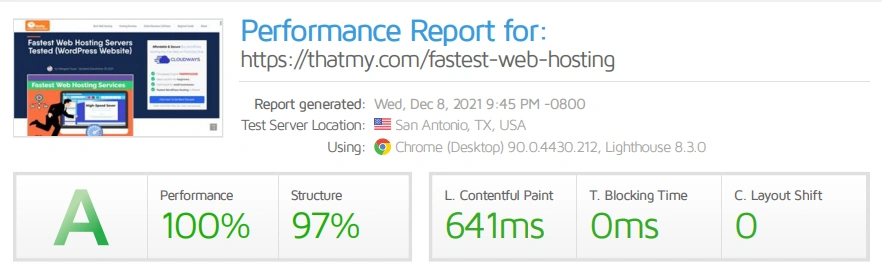
2. Entry Plan Capacity vs Competitors
At ₹1,045/mo, here is what you get vs managed hosting alternatives:
| Provider | Entry Price | Monthly Visit Capacity |
|---|---|---|
| Cloudways DO BLR | ₹1,045/mo | 840,000+ visits |
| Kinsta Starter | ~₹2,850/mo | 20,000–25,000 (overage after) |
| WP Engine Startup | ~₹2,850/mo | 25,000 (overage after) |
In India, where festive sales (Big Billion Days, Great Indian Festival, Diwali) regularly drive 10× traffic spikes, the 840,000+ visit capacity at entry price is not just a benchmark — it is the difference between your site staying up or going down.
3. AI Copilot — Free for All New Accounts
Every new Cloudways account (including India signups in 2026) gets 5 free AI Copilot credits at signup. AI Copilot is now generally available to all users and gives you 1-click server diagnostics, instant troubleshooting insights, and automated issue detection — without needing sysadmin knowledge. Its new 1-click SmartFix can auto-resolve common problems for you, from restarting failed services to cleaning up disk space, while you stay in full control. For Indian developers and agencies managing client sites, this removes a major barrier to managed cloud hosting.
How to Apply a Cloudways Promo Code in India (5 Steps)

Cloudways buries the promo code field. It is not visible until you click a small text link on the signup form. Miss it and you end up on a bare 3-day trial with zero credit and no way to add the code after the fact.
1. Open Signup Through Our Link First
Click our partner link before filling in any details. It drops a tracking cookie that binds the code (THATMY30 for 30% off, or CLOUDS2022 for credit) to your account. Skip this step and the codes may not bind.

Your code: THATMY30 (30% off 3 months). 2. Find the Hidden "I have a promo code" Link
On the signup form, look for the small text link that says "I have a promo code" (with a ticket icon). It is tucked just above the Terms checkbox — easy to miss if you rush.

Click this blue link before hitting "Start Free." ✅ How to confirm it worked: A light green banner appears saying "Promo code applied successfully." If you do not see it, the code did not register. Clear cookies and retry.
3. Turn Off Your VPN (Important for Indian Users)
Cloudways has aggressive fraud detection. Signing up from a VPN or proxy IP triggers manual review — they may ask for a passport scan or photo ID. This is especially common for Indian users who use VPNs for work.
⚠️ To avoid manual review:
- Turn off your VPN before opening the signup page.
- If you have signed up before on your home WiFi, switch to mobile data (4G/5G) for a fresh IP fingerprint.
4. The $1 (~₹95) Authorization Hold — Do Not Panic
After signing up, click "Upgrade My Account" and add your card. Cloudways charges a $1 (~₹95) hold that reverses automatically within minutes. It is a bot/fraud check, not a real charge.
Indian card tip: Standard Visa/Mastercard debit and credit cards issued by Indian banks work fine. UPI and PayTM are not supported. If your card is declined, try a different card or call your bank to enable international transactions.
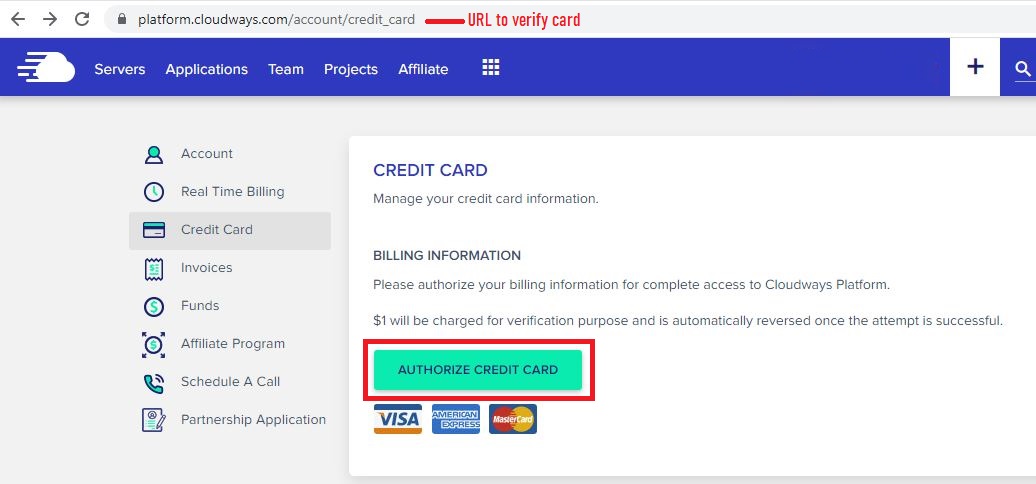
The ₹95 hold reverses within minutes. 5. Verify Your Credit or Discount
Go to Account (top right) → Real Time Billing. For CLOUDS2022 you will see "Promotion Credit: $30.00". For THATMY30 the 30% discount shows on your first invoice.

Credit appears in Funds and pays invoices automatically.
What's New at Cloudways in 2026
Cloudways shipped several changes recently that affect which plan and code make sense. The quick rundown:
- Autonomous is now usage-based (Nov 2025): visit caps are gone — visits are unmetered. You pay a baseline plan plus only what you use (storage ~$1/GB, bandwidth ~$0.04/GB, autoscaling pods $0.07–$0.12/hr). Predictable for most sites, cheaper for spiky traffic. It also now runs the latest PHP 8.4.
- AI Copilot, now generally available: every new account gets 5 free AI Copilot credits for 1-click diagnostics and server troubleshooting — plus new 1-click SmartFix that auto-resolves common issues (restart failed services, free up disk space) with no sysadmin skills needed.
- Object Cache Pro free on 4GB+ servers: the premium Redis object cache (normally ~$95/mo), now with Relay, is bundled free on Flexible servers with 4GB RAM or more — a real speed win for WooCommerce and LMS.
- Lightning Stack: the NGINX + PHP-FPM stack delivers up to 65% faster dynamic responses than the old Apache/Varnish hybrid (independent Koddr.io benchmark).
- Unlimited free migrations remain part of the standard offer — Cloudways' team moves your existing sites at no cost.
Cloudways Pricing in Indian Rupees (₹) — 2026
All Cloudways prices are billed in USD. The table below converts current plans to INR using the live exchange rate fetched at the time this page was last built. Current rate: 1 USD = ₹95 (updated 12 July 2026).
| Provider | USD/mo | INR/mo (≈) | RAM | Storage |
|---|---|---|---|---|
| DigitalOcean Bangalore ⭐ | $11 | ₹1,045 | 2GB | 50GB NVMe |
| Vultr High Frequency | $13 | ₹1,235 | 1GB | 32GB NVMe |
| DigitalOcean (4GB) | $26 | ₹2,470 | 4GB | 80GB NVMe |
| Autonomous Growth | $99 | ₹9,405 | Managed | 20GB + usage |
| Autonomous Scale ⭐ | $199 | ₹18,905 | Managed | 50GB + usage |
| Autonomous Plus | $399 | ₹37,905 | Managed | 100GB + usage |
Autonomous is usage-based (since Nov 2025): the monthly figure is a baseline plan — you also pay for what you use (storage ~$1/GB, bandwidth ~$0.04/GB, and autoscaling pods at $0.07–$0.12/hour per server). Visits are unmetered. Want a classic fixed monthly price? Use a Cloudways Flexible plan above with THATMY30.
Savings with THATMY30 (30% off × 3 months):
- DO Bangalore $11/mo → save ₹941 total over 3 months
- DO 4GB $26/mo → save ₹2223 total over 3 months
- Agency $100/mo → save ₹8550 total over 3 months
With CLOUDS2022 ($30 credit = ₹2,850): Covers ~3 full months on the DO Bangalore starter.
GST note: Cloudways is invoiced from outside India. Most Indian businesses and individuals do not pay additional IGST on this service under the import-of-services rules. Consult your CA for your specific B2B or B2C situation. Your card statement will show the charge in INR at your bank's prevailing exchange rate.
How Cloudways Billing Works for Promo Codes
Cloudways billing is different from every other host: they bill hourly based on actual usage, and your promo codes interact with a live billing engine rather than a shopping cart. Understanding this lets you stretch the discount further.
1. Post-Paid Hourly Billing
Unlike Hostinger India where you pay ₹1979/mo upfront for 3 years to get the advertised rate, Cloudways bills you after you use the service — the same way your electricity bill works.
- Pay for hours used: Spin up a server Monday morning, delete it Wednesday night, pay for ~48 hours (~₹70).
- Invoice arrives on the 1st: For whatever you used in the previous month. No upfront payment, no annual lock-in.
2. Stopping vs. Deleting a Server
🛑 Stopping a Server
Still billed. Cloudways reserves your dedicated IP and NVMe storage on the physical rack even with CPU off. The provider charges them for it.
✅ Deleting a Server
Not billed. Deleting releases the IP and wipes the disk. The billing clock stops the second you hit Delete.
3. What Drains Your ₹2,850 Credit Faster
- Offsite backups (₹3/GB/month): On a 10GB site with daily backups, this adds ~₹95/mo. Set retention to 1 week during your credit period.
- Bandwidth on AWS/GCE: DigitalOcean and Vultr include 1TB+ bandwidth — fine for most Indian sites. AWS and GCE charge for bandwidth and can burn through credit fast.
- Email add-on: ₹95/mo per mailbox. Use Google Workspace separately to keep your Cloudways bill predictable.
Quick tip: Drop Backup Retention to 1 week during your CLOUDS2022 credit period. That alone stretches a ₹2,850 balance by an extra week of server time.
Real Cost Breakdown: ₹1,045/mo vs ₹250/mo Shared Hosting
The most common objection from Indian users: "₹1,045/mo? BigRock gives me unlimited hosting for ₹99/mo." I said the same thing before I switched. But you are comparing two completely different products.
1. "₹99/mo Unlimited Hosting" — What You're Actually Getting
Cheap Indian shared hosts (BigRock, MilesWeb, Hostgator India) sell "unlimited" plans by stacking hundreds of accounts on a single server. One site runs a heavy cron job and your TTFB jumps from 200ms to 3+ seconds. You cannot fix it.
- Dedicated CPU: On Cloudways, your CPU is reserved. No "noisy neighbour" effect.
- Dedicated RAM: Memory is physically reserved for your application.
- NVMe SSD: High-speed disk I/O that does not choke on database-heavy WooCommerce or LMS queries.
- Zero inode limits: Unlike GreenGeeks or SiteGround, you will never hit a hidden file cap.
Why the price gap is misleading
On shared hosting, your CPU, RAM, and disk are shared with hundreds of other accounts. With Cloudways, they are isolated. That is what the extra ₹795/mo buys: consistent performance under load. For any Indian site that generates revenue — a WooCommerce store, a SaaS app, a lead-gen funnel — that is not optional. It is the baseline.
2. No Renewal Trap
With Hostinger India, the introductory price is ₹79/mo. The renewal hits ₹649/mo. With MilesWeb, ₹40/mo becomes ₹399/mo after year one. With Cloudways, the price on day one is the price today. No bait-and-switch. For Indian businesses planning for 2–3 years, this is a significant difference in total cost.
- No upfront lock-in: Do not pay ₹37,620 upfront to get a "deal." Your cash stays liquid for marketing, product, or operations.
- Scales with actual traffic: Upgrade to a 4GB server for a sale event, scale back down the following week. Your bill reflects only the hours used — not a full month.
3. Hidden Costs to Plan For
- Offsite Backups: ₹3/GB/month. Keep retention at 1 week during your promo period.
- Email: ₹95/mo per mailbox. Not included. Use Google Workspace.
- Cloudflare Enterprise CDN: ₹474/mo (~$4.99) per domain on Flexible — bundled free on Autonomous. Optional, but strong for a global audience.
- Object Cache Pro: free on 4GB+ servers (normally ~$95/mo) — a major speed win for WooCommerce and LMS at no extra cost.
- AWS/GCE Bandwidth: DigitalOcean and Vultr include generous bandwidth — stick with those for Indian sites unless you have a specific need for AWS.
Real takeaway
Your Cloudways bill is shaped more by your configuration choices than the base server price. When I switched from AWS to DigitalOcean Bangalore and reduced backup retention from hourly to daily, my effective bill dropped nearly 40%. The server price did not change — my settings did. Use THATMY30 for 30% off during your first 3 months while you optimise your setup.
Why I Kept Using Cloudways After the Credit Ran Out
When my ₹2,850 credit ran out in 2022, I seriously considered going back to shared hosting. Three things inside the first paid month convinced me to stay:
- Speed that translated to revenue: My site went from a 3.2s load time on shared hosting to under 900ms on Cloudways Vultr HF. My bounce rate dropped 18%. For an Indian ecommerce site, 1-second faster load time translates to 7% more conversions (Google India data).
- No renewal trap: I hate bait-and-switch pricing. Cloudways charges the same on day 1 and year 3. No ₹79/mo → ₹649/mo surprise.
- Real server control: SSH access, PHP memory limits, cloud provider switching, Cloudflare Enterprise — all without filing a support ticket. I once waited 48 hours for GoDaddy to increase my PHP memory limit. On Cloudways I did it in 10 seconds.
Bottom line: The Cloudways promo code gets you in the door for free. What keeps you is the speed, transparent pricing, and control you cannot get on ₹99/mo shared hosting. I have been a paying customer for over 3 years with no plans to switch.
All Active Cloudways Deals — 2026
Last verified: 12 July 2026.
🚀 Active Codes Right Now
Autonomous
Exclusive discount for Cloudways Autonomous (managed WordPress, autoscaling, free Cloudflare Enterprise).
Use THATMYCLOUD ➜Limited time
75% off Advance Support add-on — ₹2,375/mo ($25) instead of ₹9,500/mo. Priority support for agencies.
Check Offer ➜Frequently Asked Questions — Cloudways Promo Codes India
Questions I get asked most often from Indian users, in comments and direct emails.
Cloudways Promo Code FAQs — India
What is the best Cloudways promo code for India right now?
For 2026, our primary exclusive code is THATMY30 — 30% off your invoice for 3 months. At the DigitalOcean Bangalore starter (₹1045/mo), that saves ₹941 over 3 months. Prefer a flat credit? CLOUDS2022 drops ₹2850 (~$30) into your Cloudways Funds balance at signup, covering roughly 3 months on the Bangalore starter. Running managed WordPress on Cloudways Autonomous? Use THATMYCLOUD. All three are tested monthly on fresh signups.
Does Cloudways offer a free trial for Indian users?
Yes. Every new Cloudways account — including Indian signups — gets a 3-day free trial automatically. No credit card needed to start. 3 days is enough to test TTFB and the dashboard, but not enough for a proper migration. Stack THATMY30 (30% off 3 months) or CLOUDS2022 (₹2850 credit) on top to turn the trial into 2+ months of real testing.
How do I know the Cloudways promo code worked?
Two signals. First, a green confirmation banner appears on the signup form when the code registers. Second, after logging in go to Account → Real Time Billing. For THATMY30, the 30% discount appears on your next invoice. For CLOUDS2022, you see ₹2850 (~$30.00) in your Funds balance. If either is missing, clear cookies, open a fresh incognito window, and retry. If it still does not show, Cloudways support adds it manually the same day.
How do I cancel the Cloudways free trial?
There is no cancel button. Cloudways uses hourly billing — you simply delete the server. Open your server list, click the three-dot menu, and hit Delete. The billing clock stops the second the server is gone. During the 3-day trial there is nothing to pay. No cancellation forms, no retention calls.
How long does the CLOUDS2022 credit last for an Indian user?
On a DigitalOcean Bangalore 2GB plan (~₹1045/mo), the ₹2850 credit lasts about 3 months. If you enable offsite backups or email add-ons the credit burns faster. Keep your setup minimal during the credit period — one server, local backups only — to stretch it as far as possible.
Why does Cloudways need a credit card even for 'free' credit?
Because the ₹2850 credit buys real server time on real hardware (DigitalOcean, Vultr, Linode, AWS, or GCE). A card on file confirms you are a real person, not a bot. The verification is a refundable $1 (~₹95) authorization hold. It appears on your card and reverses within minutes. After that, your card is only charged once the credit or discount period is fully consumed.
Is the CLOUDS2022 code still working in 2026?
Yes. I test this code every month on a fresh Cloudways signup. As of 12 July 2026, CLOUDS2022 is active and applies the full ₹2850 (~$30) credit. If it ever stops working this page is updated the same day. If you prefer a percentage discount instead, use THATMY30 for 30% off 3 months.
Can I use multiple Cloudways promo codes at once?
No. Cloudways allows one promo code per account, locked at signup. You cannot stack THATMY30 with CLOUDS2022. The break-even point: if your monthly bill exceeds ~₹3230 (~$34), THATMY30 wins because the percentage scales with spend. Below that, CLOUDS2022 wins because the flat ₹2850 covers more months. Running Cloudways Autonomous? Use THATMYCLOUD — it does not compete with the other two.
What is the difference between a Cloudways promo code and coupon code?
Nothing. 'Cloudways promo code,' 'Cloudways coupon code,' 'Cloudways discount code,' and 'Cloudways voucher code' all refer to the same thing: a code entered at signup for a credit or percentage discount. All work identically inside the Cloudways signup form.
Does Cloudways have a student discount?
Cloudways does not run a dedicated student programme. The ₹2850 free credit from CLOUDS2022 is better than most student discounts anyway. It covers roughly 3 months of real cloud hosting at zero cost, no student ID needed — plenty of runway for portfolio sites, coursework projects, or college startups.
Which Cloudways code is best for Indian agencies?
If your monthly Cloudways bill exceeds ₹4750 (~$50), use THATMY30. At ₹9500/mo spend, THATMY30 saves ₹8550 over 3 months — three times more than the flat credit. Pair it with Cloudways Client Billing and Reporting for automated invoicing to your own clients, and the unlimited-sites policy (vs Kinsta at $35/site or WP Engine at $25/site) further compounds the savings.
Does Cloudways work with AI Copilot and Cloudflare Enterprise?
Yes. Cloudways AI Copilot ships free with every new account — you get 5 free AI Copilot credits for 1-click server troubleshooting and instant insights. Cloudflare Enterprise CDN is a paid add-on on Cloudways Flexible and bundled free on Cloudways Autonomous (a value of ~$250/year = ~₹23750/year). The THATMY30 30% discount applies to the full invoice including Cloudflare Enterprise during the 3-month window.
Does Cloudways have a money-back guarantee?
Cloudways does not need a classic refund policy because they use post-paid hourly billing. You only pay for the exact hours your server ran. Delete a server on Wednesday that you spun up Monday and you have paid ~₹95 (~$1). No annual contracts, no refund requests. Stack the 3-day free trial with CLOUDS2022 and you get roughly 2 months of effectively risk-free testing.
Can I switch promo codes after signing up?
No. Codes are locked to your account at signup. If you applied THATMY30, you cannot retroactively switch to CLOUDS2022. Run the numbers using the INR pricing table on this page before creating the account. If you chose the wrong code, the workaround is signing up fresh with a different email address.
Is Cloudways available in India and which server location should I choose?
Yes, Cloudways is fully available to Indian users and accepts international Visa/Mastercard. For Indian-audience websites, choose DigitalOcean Bangalore (~₹1045/mo starter) — it is the closest major datacenter to NCR, Mumbai, and Bangalore, where 65% of India's startup ecosystem is concentrated. AWS Mumbai is available for enterprise workloads. Cloudways performance data shows Mumbai-hosted WordPress sites achieve an LCP of 1.3s with Cloudflare CDN enabled. THATMY30 and CLOUDS2022 both work on the Bangalore server — the discount applies regardless of which datacenter you choose.
Can Indian users pay for Cloudways in INR or via UPI?
Cloudways bills in USD only. Payments go through Visa or Mastercard international credit/debit cards — standard Indian cards issued by any major bank work fine. UPI, PayTM, and net banking are not currently supported. Your card issuer may charge a foreign transaction fee (typically 1–3.5%). To minimise this, consider zero-forex-markup cards such as Niyo Global, HDFC Regalia, or Axis Atlas. The billed amount in INR will reflect the live USD/INR rate on your statement date.
Video: Cloudways Promo Codes 2026 Compared
🚀 Activate THATMY30 — 30% Off 3 Months ➜
Applied at billing. $1 card verification required. New accounts only.
Disclosure: This site earns commission when you sign up through our links. All promo codes are tested monthly on real Cloudways accounts. Exchange rate fetched at build time from Frankfurter API.